
About Us
Assalamu Alaikum. I’m Syed Burhan Shah, creator of MEPCO Online Bill. My background is rooted in Pakistan’s power-distribution reality long days around sub-division offices, field visits to substations, and countless conversations with teams who manage feeders, meter data, billing cycles, and loss control. If you’ve ever stood at a counter trying to understand a fuel adjustment or slab change, I’ve been on the other side of that window helping people make sense of it.
This site turns that practical experience into a public service: a clean, fast and transparent way to check your MEPCO bill through the official portal, estimate your next bill with our calculator.
Important: MEPCO Online Bill is independent and informational. We are not the official MEPCO or PITC website. For payments and records, we send you to the official portal to view, download, or print your bill.
Why I Built This (And For Whom)
Most consumer issues fall into three buckets: finding the latest bill, understanding fuel adjustments & slab changes, and planning the next month’s amount. MEPCO Online Bill exists to solve exactly these with speed, clarity, and accuracy.
Open Your Official Bill Fast
Enter Reference No. or Customer ID; we route you to the official portal to view, download or print. No sign‑ups.
Estimate With Confidence
Calculator mirrors NEPRA‑notified slabs & common surcharges (GST, TV Fee, FPA, QTR) with clear, plain‑language breakdowns.
Understand Every Line
We explain slabs, FPA & QTR adjustments, rounding differences, and typical causes of portal errors.
What You Can Do Here
Open Your Official Bill Fast – Enter your Reference No. or Customer ID, we route you to the official portal to view/download/print. No sign-up, no friction.
Estimate Next Month’s Bill (Accurate, explained) – Our calculator mirrors NEPRA-notified slabs and common surcharges (GST, TV fee, FPA, QTR adjustments). Results include a plain-language breakdown so you know why a number appears.
Understand the Charges – Simple explanations for slabs, FPA, QTR, MDI/TOU notes where applicable, and why rounding differs sometimes.
Practical Energy-Saving Tips – Field-tested steps that reduce units without making life difficult.
FAQs
Both appear on your printed bill. The Reference No. is typically a 14‑digit code; the Customer ID is shorter. Use either on our page to open your bill on the official MEPCO/PITC portal.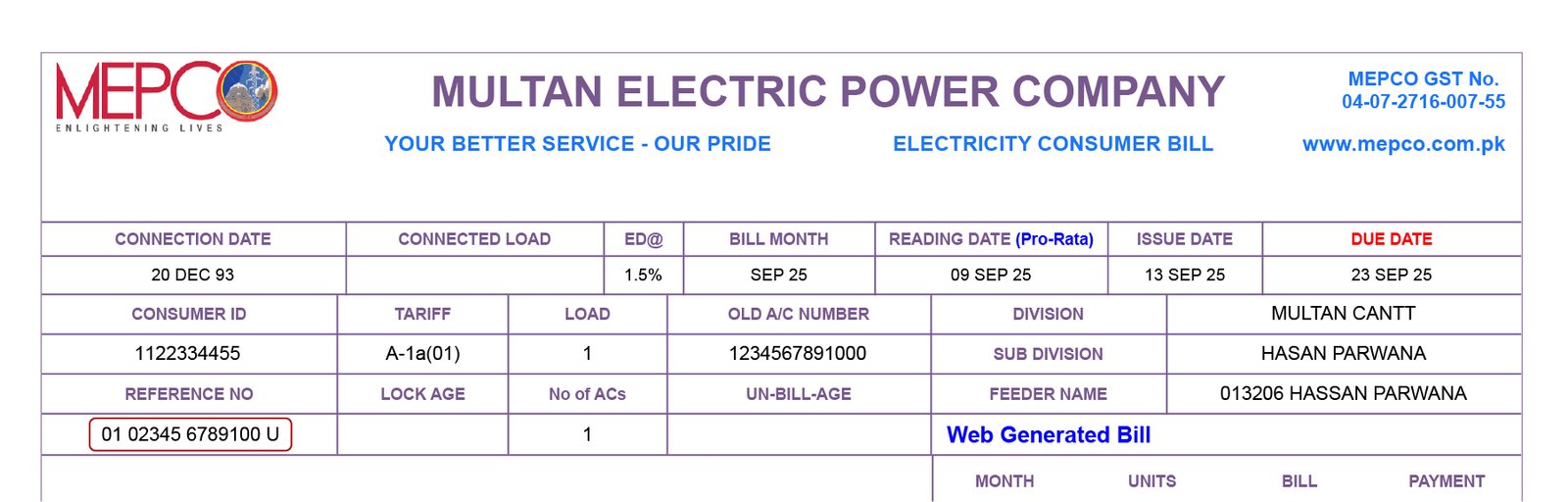
First, recheck digits and spacing. If the cycle hasn’t posted yet or there’s a portal delay, your bill may appear within 24–48 hours. For persistent issues, contact your sub‑division or the official MEPCO helpline.
No. We’re an independent helper. We route you to the official portal to view/download/print your bill; payments are made via official channels (Nearest bank branch or pay it online using mobile apps like JazzCash, Easypaisa, and bank mobile apps.).
The official portal value is the source of truth and may reflect updates (meter reading corrections, FPA/QTR revisions, or rounding). Always verify amounts on the official site before paying.
FPA (Fuel Price Adjustment) and QTR (Quarterly Adjustment) are periodic adjustments notified officially. They may increase or decrease the current cycle’s payable amount based on fuel cost variations and quarterly true‑ups.